
Creating a sitemap for your WordPress website should only take a few minutes. While many options for creating a sitemap exist in WordPress, we use Yoast SEO since it's a built in feature we already use on sites we build or market. The full configuration follows.
Creating an XML Sitemap With Yoast SEO
To configure your XML sitemap with the Yoast plugin, complete a few short steps.
- Log into your WordPress dashboard on your website.
- In the left menu, you'll see a listing labeled SEO. Click this link.
- Select the General tab underneath SEO.
- Within the Features section, beneath General, you'll see a switch for On/Off of your XML Sitemaps. Toggle this switch on to turn on an XML map of your website.
To view what your sitemap looks like, type the string /sitemap.xml after your domain (for example, yoursite.com/sitemap.xml). Now that you've finished creating this directory, search engines like Google can digest the content and structure of your website better.
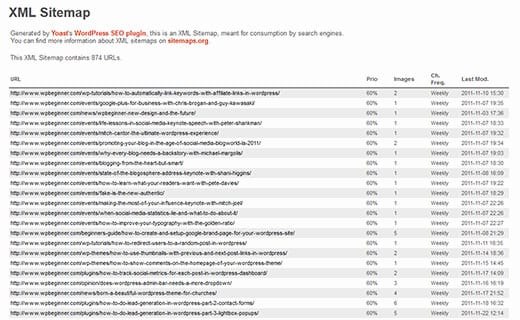
Simply waiting for search engines to crawl and read your site can be painstakingly slow, however. There's an easier way to get this newly created map into search engine databases.
Submitting Your XML Sitemap to Search Engines
Submitting Your Sitemap to Google
Since Google is the most successful search engine in the world, you'll definitely want to submit your website here.
- Sign into Google Search Console.
- In the sidebar, select your website. (Add your website to Google Search Console if you haven't already done so.)
- Click on Sitemaps. This is located underneath the Index section.
- Remove any outdated or inaccurate sitemaps from this section.
- Enter
sitemap.xmlor your website's formatted URL for this file in the "Add a New Sitemap" section to complete the full URL for your website. - Click submit and you're done.

Submitting Your Sitemap to Bing
Submitting to other search engines helps with your visibility all over the internet. Many people use Bing simply because it's the default search engine on their computer.
- Sign into Bing Webmaster Tools.
- On the "My Sites" page, select your website. (Add your website here as well if you haven't previously done so.)
- Click Configure My Site and select the button for Sitemaps.
- Remove any old or inaccurate sitemaps here.
- Enter your new sitemap URL structure here and click submit.
Submitting Your Sitemap to Yandex
Yandex is a search engine founded in Russia and accounts for a market share of over 50% of search traffic in Russia. This means there's both plenty of web traffic and crawlers here to bolster your website's relevance on an international scale.
- Sign into Yandex Webmaster Tools.
- Select your website from the home page.
- Select Indexing Options and then Sitemap Files.
- Remove any old sitemaps that are no longer functioning or accurate.
- Type or copy your full sitemap URL into the text box at the top of the screen and click add to finish.
Submitting Your Sitemap to Baidu
Baidu is the 4th largest website on the internet as measured by global traffic rankings. While this is the second largest search engine in the world, since it has a 78% market share of Chinese search engine use, it's largely ignored by the western world. It should not be dismissed so lightly. We've found that submitting a sitemap to Baidu significantly helps in overall indexing and ranking.
- Baidu only accepts text format, XML format, and sitemap index formats for submission.
- Maximum size of your map must not exceed 10MB.
- Login to your Baidu Webmaster Tools account.
- Select the verified website you're submitting for.
- Click on the Submit Sitemap button and you're done.
Listing your sitemap within your robots.txt file is another way to make certain that search engines that don't accept a manual submission can quickly locate and index your website. Add a line like Sitemap: https://yoursite.com/sitemap.xml at the bottom of your robots.txt.

Why This Matters
While these are the only four major search engines we know of to submit to today, this process changes over the years and you should always submit to as many places as possible. More indexing equals more traffic. A 10 minute investment in submitting sitemaps to four search engines compounds over years of indexing improvements.
If you need help with the technical SEO foundation across the rest of your site (schema markup, internal linking architecture, page speed), see our best local SEO strategy guide or reach out.


